So verbindest du Shelly-Geräte mit der Aero-2 App
Um Shelly-Geräte mit Aero-2 zu verbinden, musst du dein Shelly-Cloud-Konto mit Aero-2 verknüpfen.
Das bedeutet auch, dass du neue Shelly-Geräte, die du mit Aero-2 nutzen möchtest, zunächst in der Shelly-App einrichten musst. Bitte verwende die Shelly-App und folge den Anweisungen zur Einrichtung eines neuen Geräts.
Verbindung von Shelly-Steckdosen und -Relais mit Aero-2
Die Verbindung von Shelly-Steckdosen und -Relais mit Aero-2 ist einfach:
- Tippe auf den Shelly-Bereich unter „HVAC und Geräte“
- Gib deine Shelly-Zugangsdaten ein
- Wähle das Gerät aus, das du mit Aero-2 verbinden möchtest
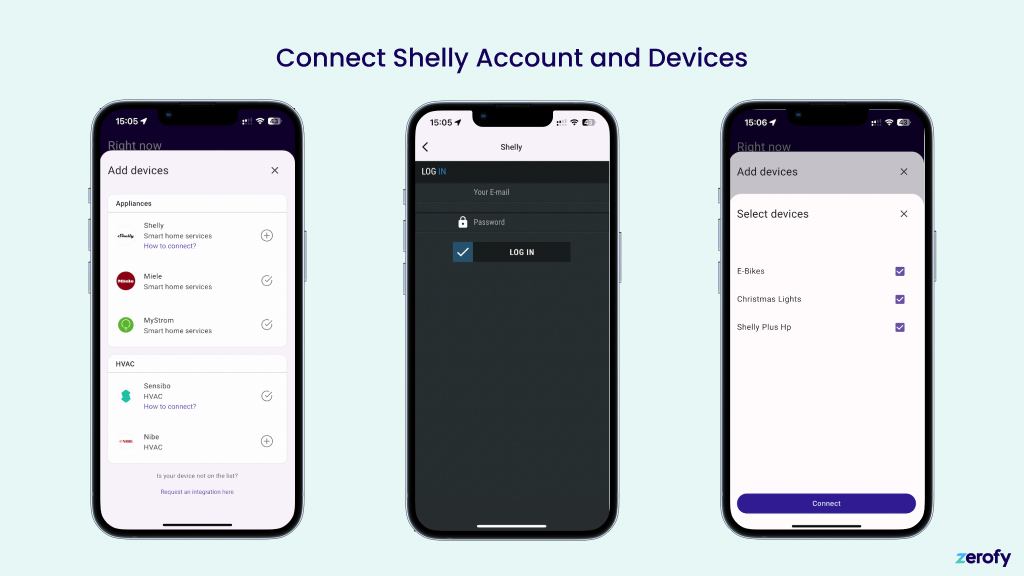
Verbindung von Shelly Pro 3EM Energiezählern mit Aero-2
Der Ablauf ist derselbe wie oben für Steckdosen und Relais beschrieben. Allerdings startest du in der Sektion Zähler in der Gerätekonfiguration der Aero-2 App. Der Gerätauswahldialog zeigt dir dann nur Shelly Pro EM Zähler und keine anderen Geräte deines Kontos an.
Zaehlertyp
Hauptzaehler: Netzzaehler. Kann als bidirektional oder als Verbrauchszaehler konfiguriert werden.Produktion: Misst die Solarproduktion. Als Unterzaehler mit Typproductionkonfigurieren.Unterzaehler: Misst beliebige Geraete als Unterzaehler und erscheint im Geraeteverbrauch.
Weitere Details mit Screenshots findest du unter Systemeinrichtung: Zaehlerkonfiguration.