So verbindest du SAJ-Wechselrichter mit der Aero-2 App
Voraussetzungen
- Stelle sicher, dass dein SAJ-Wechselrichter über das SAJ-Überwachungssystem mit dem Internet verbunden ist.
- Registriere dich auf der eSAJ Home-Plattform oder der Elekeeper-App und richte dein Konto ein.
Verbindung deines SAJ-Wechselrichters mit Aero-2
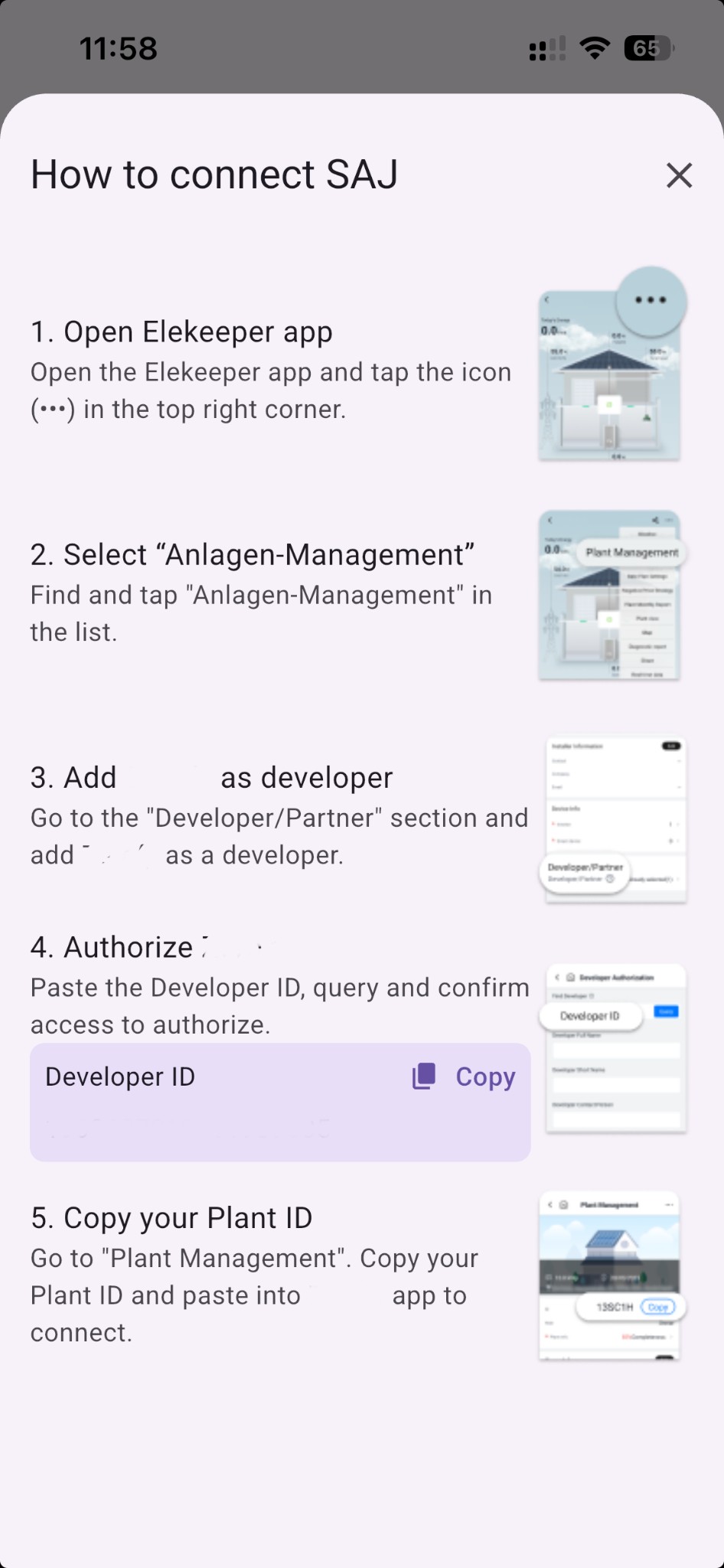
-
Öffne die Elekeeper-App – Öffne die Elekeeper-App und tippe auf das Symbol (•••) in der oberen rechten Ecke.
-
Wähle „Anlagen-Management” – Finde und tippe auf „Anlagen-Management” in der Liste.
-
Füge Aero-2 als Entwickler hinzu – Gehe zum Bereich „Entwickler/Partner” und füge Aero-2 als Entwickler hinzu.
-
Autorisiere Aero-2 – Füge die Entwickler-ID ein (wird in Aero-2 angezeigt), suche und bestätige den Zugriff zur Autorisierung.
-
Kopiere deine Anlagen-ID – Gehe zu „Anlagen-Management”. Kopiere deine Anlagen-ID und füge sie in Aero-2 ein, um die Verbindung herzustellen.
Funktionen und Hinweise
Sobald die Verbindung hergestellt ist, kannst du:
- Die Energieproduktion in Echtzeit und historisch überwachen.
- Live-Solarerzeugungsdaten mit 5-Minuten-Auflösung einsehen.
- Den Batteriestatus und Energiefluss verfolgen (falls vorhanden).
- Geräte bei überschüssiger Solarproduktion mit Autopilot (Solar-Modus) schalten.
Die Datensynchronisation hängt von der Aktualisierungsfrequenz der SAJ-Cloud ab.
Zaehlertyp
Hauptzaehler: Netzzaehler. Kann als bidirektional oder als Verbrauchszaehler konfiguriert werden.Produktion: Misst die Solarproduktion. Als Unterzaehler mit Typproductionkonfigurieren.Unterzaehler: Misst beliebige Geraete als Unterzaehler und erscheint im Geraeteverbrauch.
Weitere Details mit Screenshots findest du unter Systemeinrichtung: Zaehlerkonfiguration.