How to connect Shelly devices with the Aero-2 app
In order to connect Shelly devices with Aero-2 , you connect your Shelly cloud account with Aero-2 .
This also means that if you purchased any new Shelly devices for use with Aero-2 , you first need to set them up with Shelly. Pleease use the Shelly app and follow its instructions to set up a new device.
Connecting Shelly Plugs and Relays with Aero-2
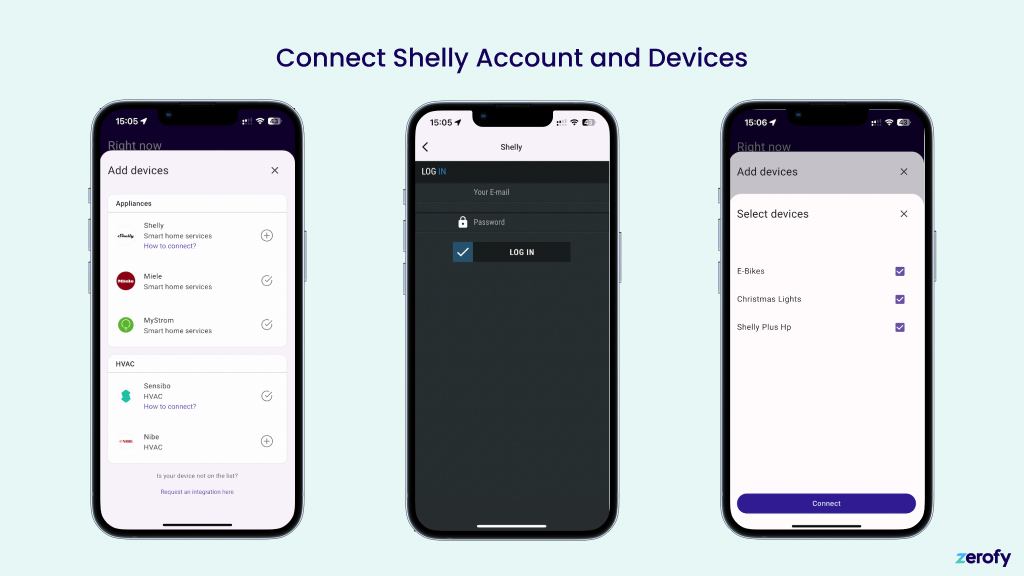
Connecting Shelly Plugs and Relays with Aero-2 is simple:
- Tap on the Shelly section under HVAC and Appliances
- Enter your Shelly account credentials
- Select the device you want to connect to Aero-2
Connecting Shelly Pro 3EM Energy Meters with Aero-2
The flow is equivalent to the one described above for plugs and relays. But you start in the section Meters in the device configuration of the Aero-2 app. The device selection dialog will show you only Shelly Pro EM meters and no other devices on your account.
Meter type
Main meter: Grid meter. Can be configured as bi-directional or consumption.Production: Measures solar production. Configure as sub meter with typeproduction.Sub meter: Measures any type of device as a sub meter and appears in device consumption.
For full setup details with screenshots, see System Setup: Meter Configuration.